Dock Killer - Workaround for Golden Gate Mission Control shortcuts
ben@octane~$ cat dock-killer---workaround-for-golden-gate-mission-control-shortcuts.txt
Since updating to MacOS Golden Gate my keyboard shortcuts for switching mission control spaces stop working, seemingly after sleeping and waking.
I setup Mission Control to use command+1..6 for space switching, which I do for just about every MacOS and non-MacOS desktop I use. After Golden Gate these frequently stop working, and the solution is to open up a terminal and do a "killall -1 Dock."
To make that a bit easier I created Dock Killer, a menu bar application that lets you restart the dock.
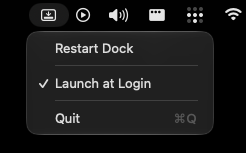
Give it a try here: DockKiller.zip
Unzip and drop the app into your Applications folder, then just run it. When your shortcuts stop working click the menu bar icon and hit "Restart Dock."
Hopefully they'll fix this soon!
ben@octane~$